Like & share

Showing posts with label i-osms. Show all posts

Thursday, September 24, 2020

i-OSMS ওয়েব সাইটে আসতে চলেছে আরও একটি নতুন মডিউল Sanctioned Post Module

 i-OSMS  ওয়েব সাইটে আসতে চলেছে আরও একটি নতুন মডিউল Sanctioned Post Module.  এই মডিউলে প্রত্যেক বিদ্যালয়ে এখন পর্যন্ত যত পোস্ট Sanction  হয়ে আছে তার সমস্ত তথ্য আপলোড করতে হবে i-osms ওয়েব সাইটে। এর জন্য বিদ্যালয়ের সমস্ত পোস্ট Sanction মেমো ও তাদের সমস্ত তথ্য দিতে হবে নির্দিষ্ট ফর্মে । 


সব থেকে প্রথমে দিতে হবে Sanctioned Post এর মেমো নাম্বার , তারিখ অ সেই মেমো তে উল্লেখিত পোস্টের ডিটেইল । অর্থাৎ সেই পোস্টে কতজনের বা কতগুলি পোস্টে আছে , কি প্রকৃতির সেই পোস্টগুলির সমস্ত  তথ্য দিতে হবে ও সাবমিট করতে হবে ।

সব পোস্টের তথ্য দেওয়ার পর সেই সব মেমোগুলির স্ক্যান কপি আপলোড করতে হবে । যদি সেই মেমো এর কপি হারিয়ে গিয়ে থাকে তাহলে সেই পোস্টের  আনুসাঙ্গিক প্রমান দিতে হবে । যেমন Approval DI এর , MC এর রেজুলেশন বা পুরানো কোন রেকর্ড আপলোড করতে হবে ।

সমস্ত তথ্য দেওয়ার পর সব তথ্য সাবমিট করার পর একটি পেজ আসবে সেখানে সমস্ত তথ্য থাকবে সেটিকে প্রিন্ট করে HM  এর স্বাক্ষরের জাগাতে স্বাক্ষর করবেন অ সেটিকে পুনরায় স্ক্যান করে আপলোড করবেন । মনে রাখবেন সমস্ত স্ক্যান পি ডি এফ এর সাইজ কিন্তু ৫০০ কে.বি এর বেশী হলে হবে না ।

সমস্ত তথ্য দেওয়ার পর সব তথ্য দেখাবে। সমস্ত তথ্য ঠিক থাকলে ফাইনালাইজ করে দিন । ও যে প্রিন্ট আউট বেরোবে তা জাম দিতে হবে ডি.আই আফিসে ।

বিশদে জানতে ভিডিও টি দেখুন ঃ


Sunday, July 23, 2017

OSMS- Submit salary with normal or periodical increment

After some changes new osms v2 now little bit stable . This site creates lots of confusion to the minds of peoples who prepare salary online for their school. The person think twice thrice or more before click on save button of periodical increment or normal 20yr 10yr benifit. If once saved then will not changed from HOI login. To change you have to run to DDO office to unlock it. Here an important information must be mentioned that if something went wrong please contact to DDO to rectify or unlock to correct the information. Go and ask for rectification whatever the problem is regarding online salary. After the month of July there will be the periodical increment module will be present in the osms. This module for increment benefit for 10,20, and 28 year benefits. I will try to light up some light on this part.

1. The 10,20,18 year benefit will be effective on the date of completion of 10,20 or 18 years . Suppose that some one complete his 10year on 12/08/2017 then after periodical check box clicked go edit and then enter the effect date of the employee. Do not state on the first day of the month.

2. The system will automatically calculate the amount of increment . (I think, because I did not try it still now on live server ).

3. In contact case of 18 year benifit please make sure that approval is given to the employee from DI and it is approved online by DDO.

4. If an employee's 10,20,18 years comes in the periode of 2nd January to 30th june do not take or give increment in this time frame. As per ropa2009 the if incumbent take increment in this period then he can not avail any increment during next 6 month. So it is better practice to take both regular and increment benifit on 1st July so he/she can get benefit of two increment otherwise only one will benefited. After 1st July to 1 January incumbent can avail any increment benefit.
loading...


The video tutorial may help little more to complete the task without error.


Friday, June 9, 2017

Online Salary management System OSMS


From today online salary management website OSMS v2 open for all from today. Every one should know what to do for first time.  

1. First change your default password .


2. Check whether the school profile data is correct or not. If any correction required then make the changes and then save it . It was said in training that an OTP will come to HM mobile while finalised the salary bill. But still now the system is not available. 

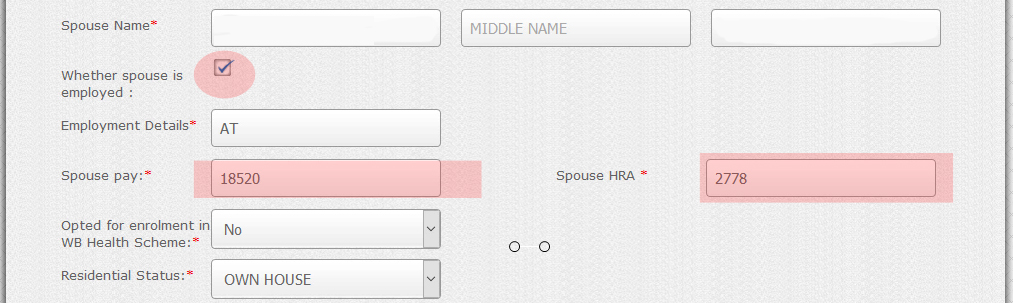
3. Every employee profile need to add the first joining date in service and the status of spouse if spouse is in service for HR allowance. If spouse HRA not entered correctly then the employee HRA will display incorrect . In salary table there is no place to change HRA.


loading...


Watch the video for more  https://youtu.be/ybks_8RzVp0


How to apply form online transfer

 
Key : #OSMS , # Online_Salary_Management, #WBSED, wbsed.gov.in , I-osms, west Bengal Education Department  

Saturday, May 20, 2017

কি আছে নতুন osms বা অনলাইন স্যালারি সিস্টেমে ?

নতুন ও.এস.এম. এস এ দুটি জেলাতে চালু হয়েছে,বাকি জেলাগুলোতে চালু হতে চলেছে পরের মাসে । বেশির ভাগ জেলাতে চলছে ট্রেনিং এর ব্যবস্থা । কি নতুন আছে এই নতুন অনলাইন ব্যবস্থাপনায় ? 1. পরিবর্তন করা হয়েছে সার্ভার । আগে ছিল এন এই সি এর সার্ভারে । এবার সেই সার্ভার নিয়ে আসা হয়েছে রাজ্যের নতুন সার্ভারে ।
2. ডাইস কোডের বদলে নতুন এই ডি দিয়ে লগ ইন করতে হবে ।
3. প্রধান শিক্ষকের মোবাইল নাম্বারে পাঠানো ওটিপি ছাড়া বেতন ফাইনালাইজ করা যাবে না ।
4. বেতনের পি এফ, ইনকাম ট্যাক্স ও লোন রিকভারি ছাড়া কোনো অংশ পরিবর্তন করা যাবে না।
5. ১০,২০,১৮ বছরের ইনক্রিমেন্ট এর আলদা ফরম জুড়ে দেওয়া হয়েছে ।


loading...


6. ট্রান্সফার এর ক্ষেত্রে ওই শিক্ষকের প্রোফাইল নতুন বিদ্যালয়ে নতুন করে আপলোড করতে হবে না। পুরাতন বিদ্যালয় তার প্রোফাইল ট্রান্সফার করে দেবে সেই বিদ্যালয়ে ।
7. স্যালারি টেবিলে পার্ট স্যালারি , নো স্যালারি ও ফুল স্যালারি অপশন দেওয়া হয়েছে।
8. সব বেতনের ক্যালকুলেশন সব সিস্টেম করে দেবে।
9.ব্যাঙ্ক একাউন্ট পরিবর্তন করার নতুন অংশ দেওয়া হয়েছে।
10.এই সাইটের তথ্য ই-সার্ভিস বুক ও ই-পেনশনের সাথে পরবর্তী ধাপে যুক্ত করা হবে।
11. নতুন মোবাইল এপ্লিকেশন আনা হবে যার সাহায্যে সব শিক্ষকরা তাদের স্যালারি স্লিপ ডাউনলোড করতে পারবেন, পি এফ সম্বন্ধে জানতে পারবেন ।

ভিডিওতে দেখুন


#osms , new version of online salary management lunched , #I-osms , new features added in new OSMS for the education department of West Bengal , in next step it will integrate with e-service book and e-pension system.

Friday, December 30, 2016

How to submit online salary of West Bengal govt sponsored and Govt aided school and Madrasah

How to submit online salary of West Bengal govt sponsored and Govt aided  school and Madrasah

To submit you need to login in http://osms.wbsed.gov.in/. click on Enter then  a screen will appear. In the form first select user level. For schools or madrasah select HOI( Head of the institution).

  • This will redirect to login page where you will put your school User ID, Password and CAPTCHA   code  and click on log in .
  • After log in the home page of the institution will come. 
  • Then flow the steps as shown in the video .


Return Overdrawn amount through online, OSMS v2 salary submission online and download Pay  Slip


Check eligible for Bonus and Submit bonus in OSMS site wes bengal ->


Periodical Increment Salary Submission(10,18,20 years) in osms v2 west Bengal 


To get more video subscribe my YouTube channel : https://www.youtube.com/shaftech

West Bengal SSC SLST 2016 Syllabus pdf Download Available here

  পশ্চিমবঙ্গ স্কুল সার্ভিস কমিশন (WBSSC) ২০২৫ শিক্ষক নিয়োগের বিজ্ঞপ্তি প্রকাশ করবে। সেই বিজ্ঞপ্তি অনুসারে, পশ্চিমবঙ্গের বিভিন্ন মাধ্যমিক বি...